
A fit-out contractor receives an RFQ for a hospital OPD block. The tender runs to forty-two pages, and the scope, closing date, earnest money deposit, payment terms and penalty clauses are scattered through it. Three drawings come with it. Before anyone can name a price, someone has to read every page, measure every partition, ceiling and floor on the plans, turn those measurements into a bill of quantities and price each line. In a small firm that someone is usually a director who is also running two sites. AI can do much of the reading and measuring, but only if the steps are separated and a person approves the result at the right point.
The work an estimate actually involves
The work splits into four separate jobs, and they fail in different ways.
- Reading the tender. Find the scope, dates, money terms, eligibility conditions and risks, and notice where two clauses disagree.
- Measuring the drawings. This is the take-off: running feet of partition, square feet of ceiling and flooring, the number of doors and windows, each tied to a drawing reference.
- Building the bill of quantities. The BOQ is the list of items, units and quantities that the price is built on.
- Pricing and sending. Apply the company's rates, wastage and margin, then produce a quotation the client can accept.
Only the first two are AI problems. The third is bookkeeping, and the fourth is a commercial decision that should stay with the people who carry the risk. A useful system automates the first two, makes the third automatic, and supports the fourth without making the decision.
- 01Tenderread and summarised
- 02Drawingscale and trades
- 03Take-offperson approves
- 04BOQfrom approved lines
- 05Quoterates and margin
Low-confidence items go back for review
The model works on the first two steps. A person approves the take-off before anything is priced.
What a model gets right in a tender, and where it slips
Language models are good at turning a long tender into a short summary: the scope in two or three sentences, the closing date and time, the estimated value, the EMD, payment milestones, the defect liability period, the site visit date. These are facts stated somewhere in the document, and the model's job is to find and restate them, much like the field extraction described in our post on pulling structured data from emails and PDFs.
The failure looks like a confident summary with one wrong fact in it. A closing date taken from an old corrigendum, or a defect liability period from the general conditions when the special conditions override it. The model does not know which clause wins. It only sees the text it was given.
Two design choices deal with most of this. First, every extracted item carries the page it came from, so the estimator can check the source in one click and doesn't have to trust a sentence. Second, contradictions are surfaced as questions instead of being resolved quietly. If page 17 says the ceiling height is 9 ft and the drawing note says 10 ft, the useful output is a clarification question for the client, not the model's guess.
Eligibility is a separate check and should be built as one. The tender says three similar projects above a certain value in the last five years, a turnover certificate, GST and ESI/PF registration, and enrolment on the client's vendor list. The model compares each condition against the company's own document library and marks it as met, as needing a check, or as a gap. A gap found on day one can be fixed. Found the night before submission, it means the bid is lost.
Where drawing take-off breaks
Drawing take-off is a computer vision problem, one of the uses covered on our AI solutions page. The model has to find the scale, trace walls and rooms, detect doors and windows, and measure ceilings and floors, then match each detected item to a line the company actually prices.
Accuracy depends heavily on what the drawing is made of, so measure it separately for each source:
| Drawing source | What usually goes wrong | What to do about it |
|---|---|---|
| Vector PDF or DWG | Very little; layers and text are clean | Use these whenever the client has them |
| Scanned plan | Faint lines, skew, a scale bar that is hard to read | Ask the estimator to confirm the scale or mark a known length |
| Small elevation on a busy sheet | Lengths read from tiny dimensions | Flag the item for review, whatever the model reports |
| Overlapping elements | A window counted inside a partition's area | Show both on the plan so a person sees the overlap |
The scale is the step that matters most. If the scale is wrong, every quantity on the sheet is wrong by the same factor, and they all look plausible. So the scale the model detected is shown before anything else, and the estimator can correct it by entering a known length, such as the distance between two grid lines.
Confidence scores are for sorting, not for trusting
Every detected item should carry a confidence score, and the estimator's screen should sort by it. The score is not a promise that the quantity is right. Its job is to tell the estimator where to look first.
In practice this means a company-set threshold. Items below it are marked and can be filtered to a short list, so a person checks the three doubtful lines rather than all forty. Above the threshold, the estimator still sees the item highlighted on the plan next to its quantity, which makes a wrong trace easy to spot.
- Total partition area only
- No link back to the plan
- Checking means re-measuring
- Each item with its drawing reference
- Selecting an item highlights it on the plan
- Low-confidence items listed first
The approval step belongs before the BOQ
Where you put the human check matters more than how many checks you add. Putting it at the end, on the finished quote, is too late: by then the quantities are buried in priced lines and a reviewer is checking totals, not measurements.
The approval belongs between take-off and BOQ. The estimator reviews the measured items, edits or adds what is needed, and presses approve. Only approved quantities become BOQ lines, and every BOQ line keeps its source drawing and confidence, so a question raised on the quote can still be traced back to the plan.
After that the work is arithmetic. Rates come from the company's rate card, wastage, margin and discount are set by the estimator, taxes are calculated, and a second check looks for lines that seem out of line with the rate card before the quote leaves. The commercial judgement (the margin on this job, for this client, this month) stays with the director.
How we built this for Anu IntDec
Anu IntDec is an interior and facade contractor in Sonepat, working on partitions, glazing, ACP cladding, ceilings and flooring, much of it in hospitals and factories. We built Anu IntDec Studio, the company's estimating app, around the six steps its directors already follow, from the tender to sending the quote.
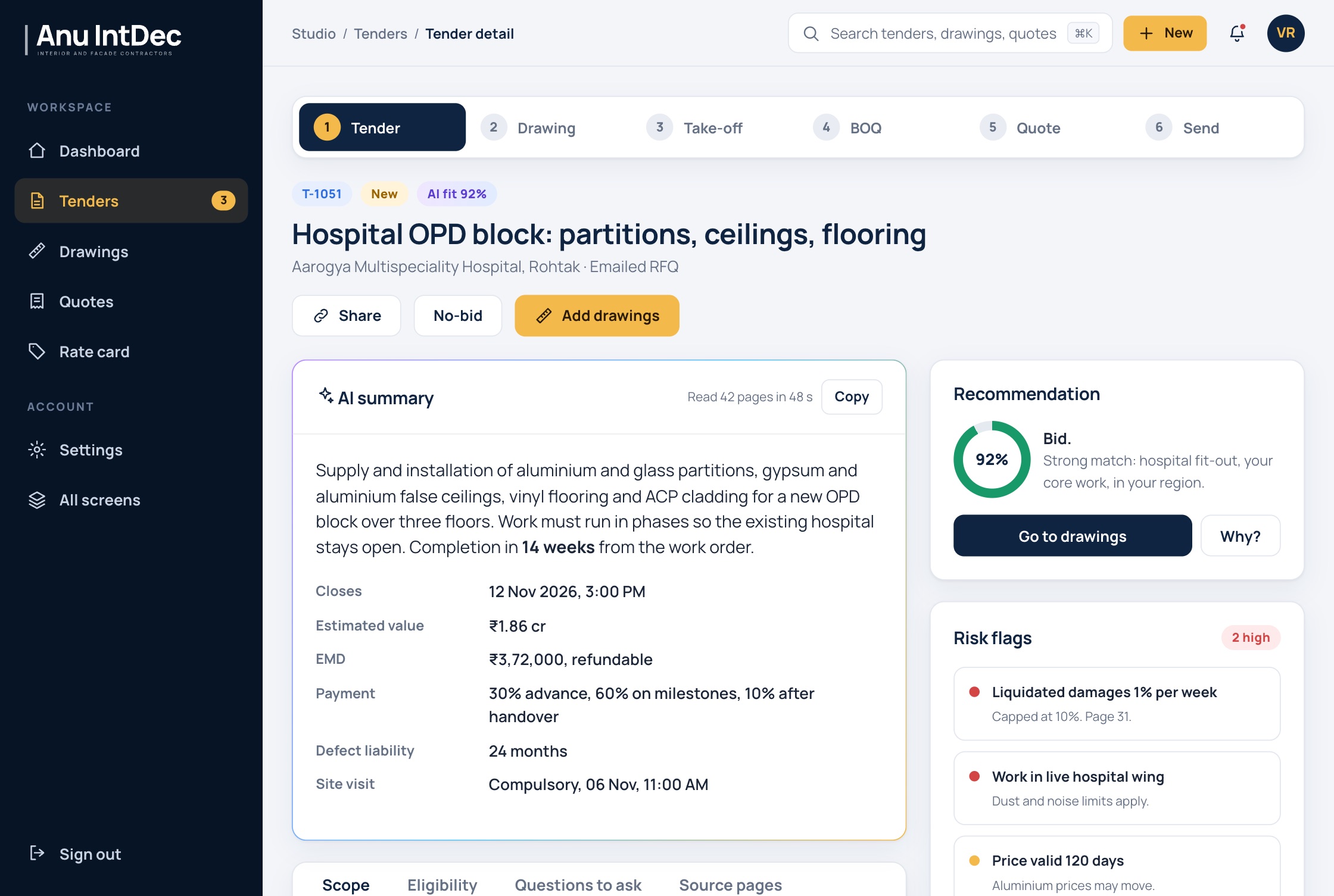
The tender screen returns a summary with page references, an eligibility check against the company's documents, risk flags, draft clarification questions, a bid checklist and a bid or no-bid recommendation with its reasons listed.
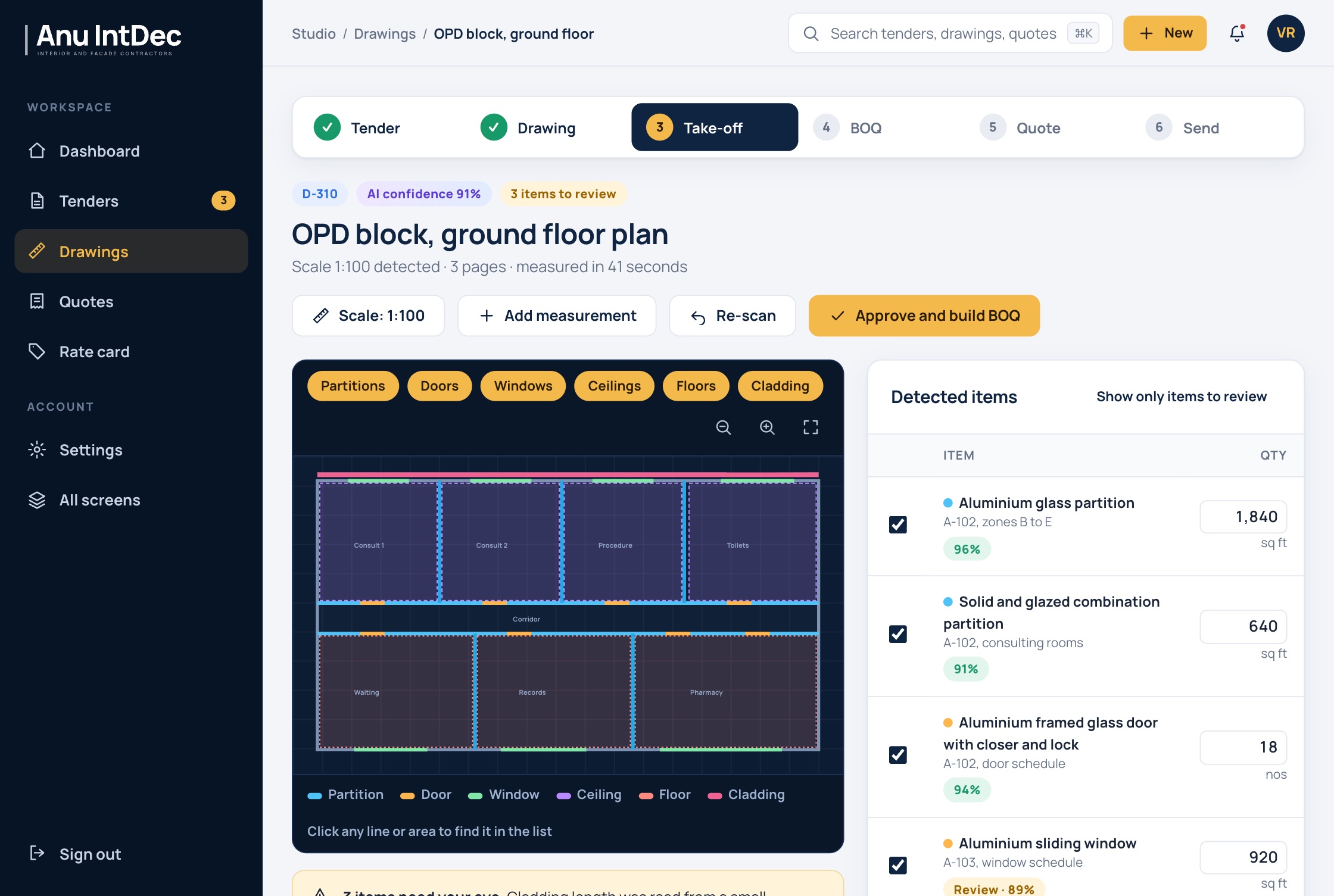
The take-off viewer puts the measured plan beside the list of detected items. Each trade has its own colour, and selecting a line on the plan highlights the matching item. Items below the threshold are marked for review, and nothing becomes a BOQ until a person approves it.
A few settings make the controls explicit. The company chooses the confidence threshold, can require a person to approve all quantities, and can keep tender documents out of model training.
Where to start if you estimate by hand today
Don't start with the model. Take your last three submitted quotes and write down, for each one, how long the tender reading, the take-off, the BOQ and the pricing each took, and where the mistakes or late changes came from. That tells you which step to automate first and gives you a set of real tenders and drawings to test against.
Then test each step on those documents separately, measuring tender facts against what the tender actually says and take-off quantities against your own measured figures. If a system can only show you a finished quote, you cannot tell which step went wrong. Ask to see the take-off before the price, with each item's source, and decide where your own approval goes before anything is built.