

A team commissioning a custom CMS usually arrives with a feature list copied from a vendor comparison page. The list grows, the build slows, and at launch the editors still cannot see who approved a page. We think five areas decide whether a custom CMS was worth building, and most of the cost sits in the details of each one rather than in the headline feature.
An API every client can use
A custom CMS should store content as structured entries and serve them through a documented API, REST or GraphQL. The Next.js site, the mobile app and the internal tool then all read the same entries, and nobody keeps a second copy in a spreadsheet.
What teams get wrong is exposing database tables instead of content. An API that returns raw columns with internal names becomes a contract you can never change, because by the time you want to, three clients depend on a field called created_dt. Design the response around what the clients need, and version it from the first release. A response for a product page might look like this:
{
  "id": "gold-loan-overview",
  "type": "productPage",
  "title": "Gold Loan",
  "summary": "Loans against gold jewellery, disbursed at the branch.",
  "status": "published",
  "updatedBy": "compliance.review",
  "updatedAt": "2026-02-03T11:20:00+05:30"
}
Every field name there means something to the person reading the page and to the developer calling the API. Nothing leaks from the database's naming habits.
- Editor interfaceblocks, preview, calendar
- Workflow and permissionsroles, approvals
- Content APIversioned, documented
- Storage and audit loghistory, access records
Security and the audit trail run through every layer, not only the login page.
An editor screen people will use
If editors avoid the CMS, they will write in Google Docs and WhatsApp and paste at the end, and the CMS becomes a publishing form. What keeps them inside it is reusable blocks, a way to preview the entry in the real layout, shared editing with version history, and a content calendar. Drag-and-drop layout is worth building only where the layout really varies. For fixed templates, structured fields are quicker and keep pages consistent.
Picture an NBFC's marketing team publishing one loan product page a month. Those pages have the same sections every time, so a template with named fields beats a page builder, and the compliance reviewer can find the interest rate field without scrolling through a layout. The person who presses Publish spends their time on the wording, which is where it should go.
AI suggestions for metadata or summaries can sit in the editor, as long as an editor accepts each one. They are an add-on to the interface, not a reason to build the CMS.
Workflows that match your team
Role-based permissions for writers, editors, approvers and translators. Approval steps where a named person must sign off. Publishing to staging before production, or to regional sites. Those are the usual asks, and they are where a custom CMS differs most from an off-the-shelf one.
The reason to build custom is that your approval chain is yours. An insurance broker's content goes past compliance, a school's goes past the principal, and a sweets chain's goes past nobody until Diwali week, when suddenly everything goes past the owner. The reason not to over-build is that every state you add is another place an item can sit for a week with nobody noticing. We cover the day-to-day side of this in the piece on content workflows in a custom CMS.
Search and tagging that keep up with the library
A library of a few hundred entries can be browsed. A few thousand needs tagging and search that works. Auto-tagging and natural-language search can help, but they need a person correcting the output and some way to measure whether the results are any good. Treat them as modules you can switch off.
Nobody's real requirement is an AI feature. What they need is for an editor in the Bengaluru office to find last year's festive campaign page in under a minute, and to reuse its structure instead of starting again. Good tags, a few filters that match how editors think (by campaign, by product, by month) and sensible defaults get you most of the way there.
Security and compliance in the design
Role-based access, an audit trail of who changed what, encryption in transit and at rest, and modern sign-in such as passkeys. Which regulations apply, GDPR, CCPA, HIPAA or the DPDP Act here in India, depends on your industry and your data, and that call belongs with your legal and security people.
The CMS's job is to make the controls possible. It should let you delete a record on request, show who accessed it, and limit who can export it. Treat exports, API tokens and media URLs as part of the security design too, because they are all ways content leaves the building without passing the login page.
The same pattern in Profit Lever Models
Profit Lever Models is a finance modelling product, not a CMS, but its assumptions hub shows the same control pattern. Assumptions have owners, notes and approvals, and there is a change log. The product also has roles and permissions, and it is built with Next.js, a Django REST API and PostgreSQL, with Redis and Celery for background work.
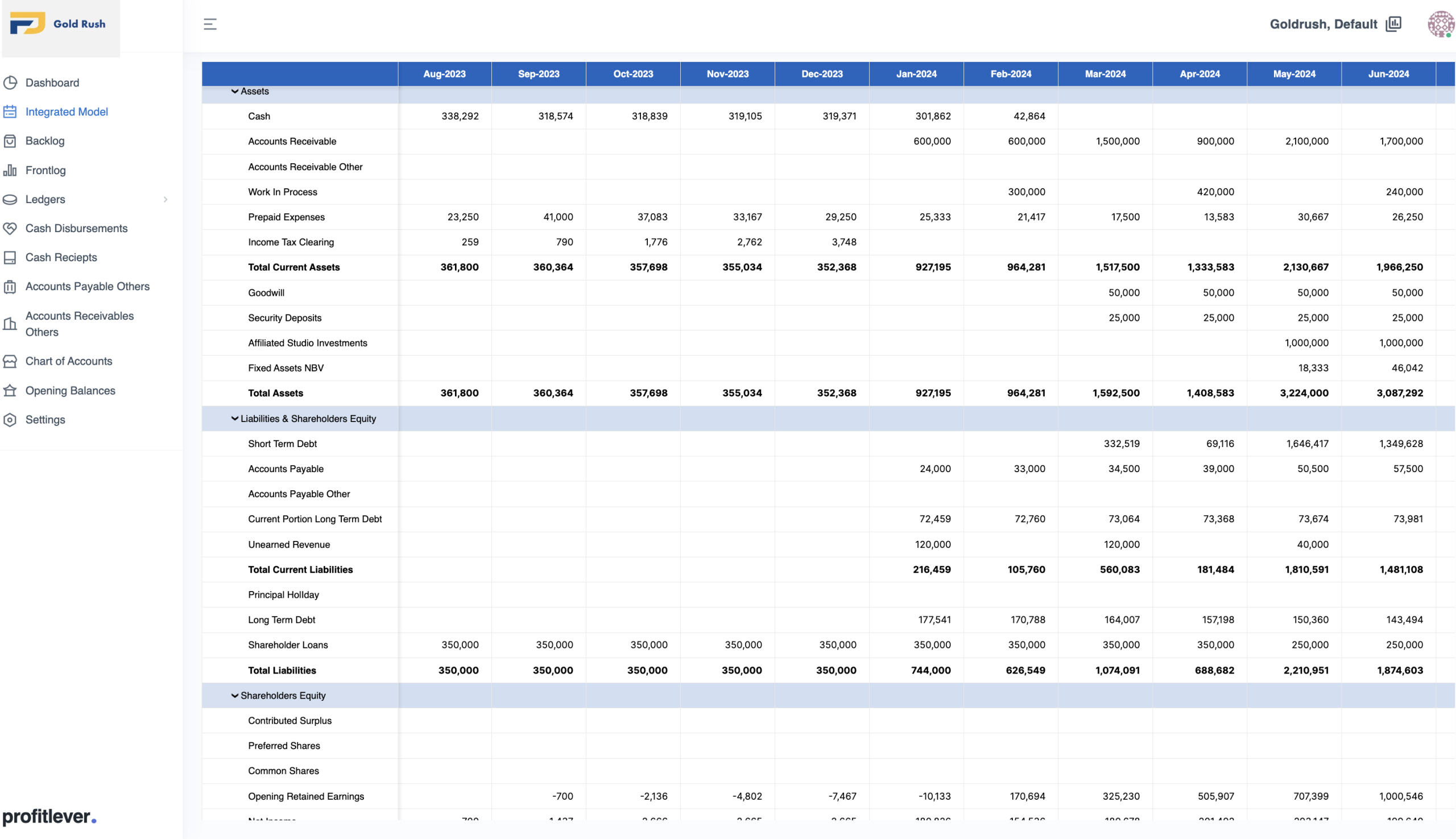
The pattern carries over to content directly. Every entry has an owner, a status, and a record of who changed it and when. Building that into the data model at the start is cheaper than bolting it on once people start asking who published a page. The Profit Lever Models project story has the rest of the product.
Traps in the first release
Building everything at once. A first release with roles, three approval states, preview and the API is enough. Search tuning and AI helpers can come after editors have used it for a quarter.
Skipping the audit trail. It is hard to add once content exists, because the first entry in the log for every old record will say "unknown".
Designing the admin for developers. Internal field names and unexplained toggles make editors nervous, and nervous editors go back to Google Docs. Label fields the way the editors talk about them.
Here is how we would sort the five areas for a typical first release:
| Area | Launch | Soon after | Later |
|---|---|---|---|
| Content API | Versioned, documented | Extra clients | |
| Editor screen | Templates, preview | Calendar, reusable blocks | Drag-and-drop where needed |
| Workflow | Roles, one approval step | Regional publishing | |
| Search and tags | Basic tags | Filters | AI suggestions |
| Security | Roles, audit trail | Export limits | Passkeys |
Take the five areas to your next planning meeting and mark each item as launch, soon or later, with the editors in the room. Most teams land on API design, roles and the audit trail as launch items, and everything else waits until editors have used the first version for a few weeks and can say what they miss. If you want a second opinion on that list, our CMS development page describes how we approach these builds.


