

In this post a forecast means a number with a date on it, a range around it, and a person who acts on it at a known time. A chart in a notebook usually has the first of those and neither of the others, which is why forecasts are admired in review meetings and then ignored by the person placing the order. Whether the number reaches that person, on time and in the screen they already use, matters more than which model produced it.
Name the decision before the model
Before any modelling, we ask four questions. Who decides, how often, in which screen, and how much error can they live with. The format of the forecast follows from the answers.
| Forecast | Decision | Who decides | Where it must appear |
|---|---|---|---|
| Demand | How much to order or produce | Buyer, planner | Purchasing screen, weekly |
| Churn | Which accounts to contact | Account manager | CRM task list, daily |
| Cash | When to delay spend or draw credit | Finance lead | Planning model, board pack, monthly |
| Capacity | When to hire or reschedule | Operations manager | Rota, roadmap, monthly |
If a row cannot be filled in, the forecast has no decision behind it yet, and it will not be used however accurate it turns out to be. The churn row is the clearest case: until someone names the account manager who will make the call, and the task list where the call appears, the score is a column nobody opens. We cover that row in more detail in turning a churn score into an action someone takes.
The second step is to write the definition down. Take a tile manufacturer in Morbi that plans next week's kiln runs every Thursday. "Demand" could mean dealer orders booked, boxes dispatched from the yard, or what the dealers sold on to builders. Sales reports the first, the dispatch office reports the second, and nobody has the third. The difference matters as soon as you look at a few sample rows.
| Week | Design and size | Orders booked | Boxes dispatched | Note |
|---|---|---|---|---|
| 31 | Matte grey 600x600 | 1,200 | 1,200 | Normal week |
| 32 | Matte grey 600x600 | 1,400 | 900 | Kiln down two days |
| 33 | Matte grey 600x600 | 700 | 1,150 | Backlog cleared |
A model trained on dispatches learns the kiln breakdown as a dip in demand and the backlog as a spike. A model trained on orders booked learns what dealers asked for, which is what the production manager is trying to plan for. Pick one, write it in the column name, and keep the other as a separate field.
What sits between the notebook and the screen
In the notebook, historical data was pulled once, the model was fitted, and the chart looked right. At the point of decision the planner needs today's data, refreshed on a schedule, a range rather than one number, the inputs that drove it, and a way to override it. Closing that gap is engineering work, and it is most of the project.
- Decision screenreorder field, CRM task, board pack
- Alerts and thresholdsfires only when an owned line is crossed
- Forecast storeevery run kept with its date and range
- Scheduled pipelinefresh inputs, model run, error against actuals
- Modelthe notebook, now a job with a version
The top layer is the only one the decision maker sees; the others have to exist for it to be trusted.
The forecast store is the layer people skip. Every run is kept with the date it was made, the inputs it used and its range, and nothing in it is ever overwritten. A minimal version has these fields.
| Field | Meaning |
|---|---|
| run_date | When the forecast was produced |
| target_period | The week or month being forecast |
| item | Product, account or cost line |
| low, likely, high | The range and the most likely value |
| model_version | Which job and parameters produced it |
That table is what lets you look back at the production plan set before the monsoon slowdown and ask what the forecast said at the time. It is also the only way accuracy becomes measurable later, because you reconcile each row against the actual once the period closes.
Ranges instead of single numbers
A single number invites false precision and an argument about the last digit. Show the range and the most likely value, and decide in advance how the range is used. Where a stockout is expensive, plan towards the upper bound. Where holding stock is expensive, plan towards the lower bound. For the tile maker that means leaning high on the sizes dealers will buy elsewhere if the yard is empty, and leaning low on a new glossy finish that takes up yard space for months if it does not move.
Calibrate the range on the model's own past errors, taken from the forecast store, and show that past accuracy right next to the forecast. The production manager can then judge how far to trust it this month from evidence, instead of from how confident the chart looks.
Where the forecast has to land
Three delivery forms cover most decisions, and each has its own rules.
A report shows forecast against actual on a fixed cadence, for people who review rather than act. It has to be reproducible, so it reads from the forecast store by date instead of recomputing when someone opens it.
An alert goes out only when the forecast crosses a line someone owns, such as cash falling below the buffer within eight weeks, or demand for a size exceeding kiln capacity next month. An alert without a named owner and an expected action gets muted within a fortnight.
A planning screen is where the forecast does the most work. It appears as the default value in the field where the decision is entered, editable, with the override recorded alongside it. Overrides are useful data. They show where the model and the planner disagree, and that disagreement is usually worth a conversation.
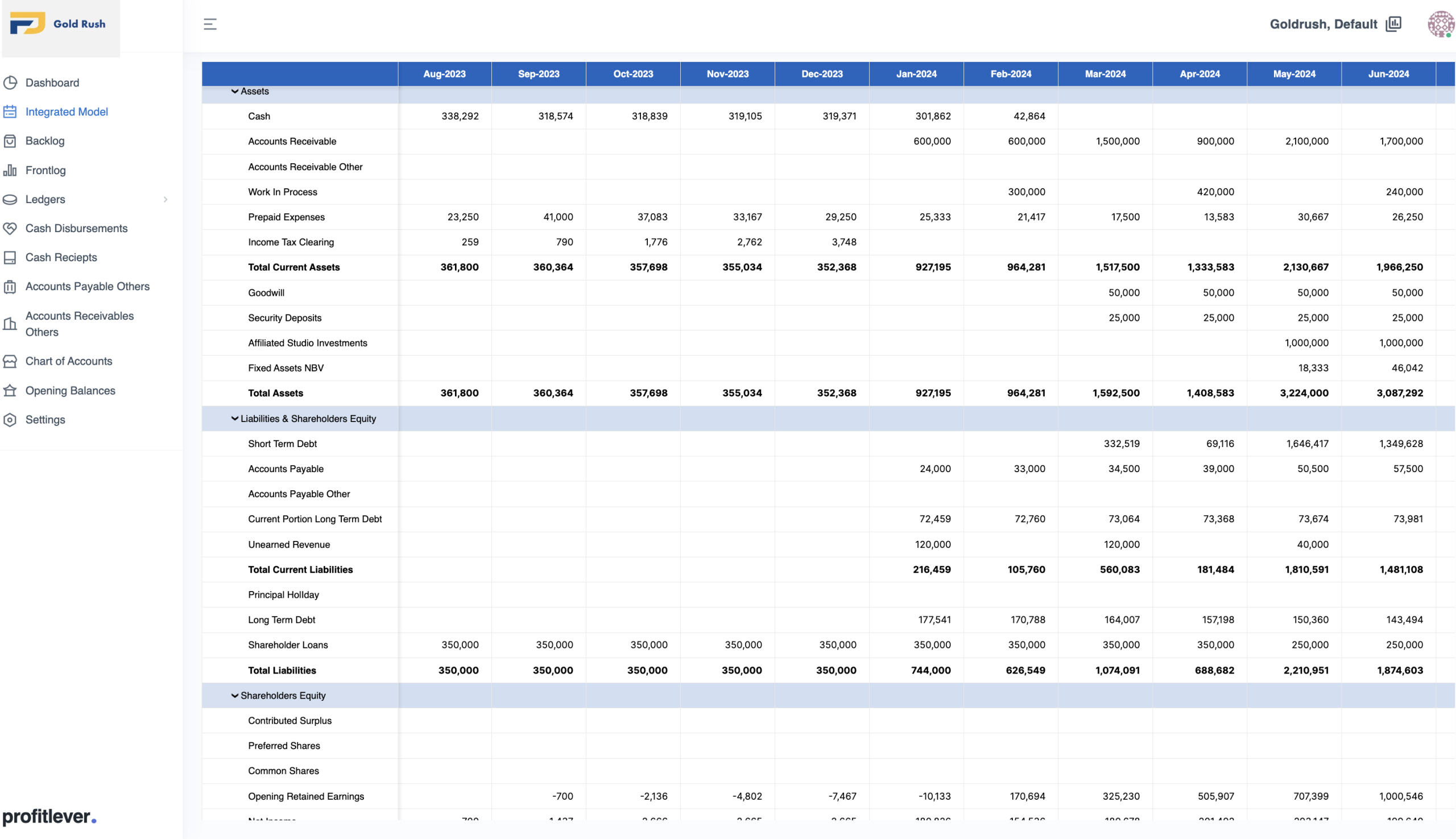
Profit Lever Models, a planning tool we built for finance teams, shows the pattern for the planning screen and the report. It is driver-based financial modelling, not machine learning: assumptions have owners and approvals, scenarios can be cloned and changed live, actuals load in for variance against plan, and the result lands in board pack templates. The numbers come from drivers rather than a trained model, but where they land, and the fact that every assumption behind them is visible, is exactly what a forecast needs.
Why forecasts get ignored
The forecast is refreshed by hand when someone remembers, so by the time it is read it is three weeks old. It lives in a separate dashboard that nobody has open at the moment of decision. The target column is whatever the warehouse happened to hold, dispatches instead of orders, and nobody wrote down which. Nothing records what the forecast said when the plan was set, so accuracy can never be reviewed.
Overrides get typed over the forecast and lost, so the model and the planner are never compared. Alerts fire on every small change and are muted by Friday. And the model is built before the decision owner is named, and then goes looking for a user.
The first month, in order
- Name the decision, the person who makes it, the cadence and the screen. Fill in one row of the first table.
- Write down what the target column means and which system it comes from.
- Build the scheduled pipeline and the versioned forecast store before you improve the model. Our data engineering work usually starts here.
- Put a plain baseline in the screen: the same period last year, or a moving average, with its range and its past error.
- Record overrides and actuals from the first week, and review them monthly.
- Replace the baseline with a trained model only when it beats the baseline on the recorded history, and decide then whether to retrain on a schedule or on a signal.
We would rather spend the first month on steps one to four than on the model. Once a baseline is in front of the person who decides, it becomes clear whether a trained model is needed at all, and the forecast store already holds the history you will judge it against.


