

Renewal emails arrive one at a time, so nobody sees the total until someone in finance puts every subscription on one sheet. That sheet usually shows two tools doing the same job, customer data in four places, and a spreadsheet the team keeps open beside a product the company pays for. Before anyone proposes building a replacement, sort out which of those problems a custom system would solve and which a cancellation would.
How subscription sprawl builds up
Sprawl is rarely one decision. Take an interiors firm in Pune with a sales team, a design studio and site supervisors who run the installations. Sales bought a CRM, the design studio bought a project tracker, accounts run Zoho Books, and someone added a helpdesk for post-handover complaints. Each purchase was sensible on the day it was made, and each one was priced per seat, so the total crept up as the firm hired.
Three years on, a client's details live in the CRM, the project tracker and Zoho Books, spelt three slightly different ways. Two tools both send site-visit reminders. Nobody can see a whole client without opening three tabs.
The most telling sign is a spreadsheet next to a paid tool. If the site supervisors keep a Google Sheet of tomorrow's visits beside the project tracker, the process does not fit the tool, and more training will not change that. That sheet is the place to look first, because it shows you the workflow the business actually runs.
Sort the list before you price anything
Every line on the subscription sheet falls into one of four actions. Most companies find that the first two remove a good share of the problem without any build at all.
| Action | When it fits | What it costs you |
|---|---|---|
| Cancel | Nobody has logged in for a quarter, or another tool does the same job | An export of the data, then nothing |
| Consolidate | Two teams use different tools for one task | Agreeing which tool wins and migrating one team |
| Connect | Each tool does its job, but staff copy data between them | A small integration layer to build and run |
| Build | The process is how you differ and no tool fits it | A system to build and maintain for years |
The third row deserves more attention than it usually gets. When the CRM and the accounting tool are both fine and the pain is re-keying between them, an integration layer often solves it. Our enterprise application integration work tends to start with exactly that kind of gap.
When a tailored system is the right call
A tailored system makes sense where your process is what sets you apart, or where connecting several tools has become a job in itself. It does not make sense for functions every company runs the same way. Nobody should build their own payroll.
- Email, payroll, standard accounting
- Process is the same as everyone's
- No team to maintain software
- Your process is how you differ
- Several tools hold the same data
- Staff run it in a spreadsheet anyway
A starting point for the discussion. Most companies end up with a mix of both.
The case for building rests on fit to your own steps, integration designed in from the start, and control over where the data is stored and how it is exported. Subscriptions turn into an upfront build plus ongoing maintenance, which suits some budgets better and others worse. The line people forget is maintenance. Software you own needs fixes, upgrades and someone who understands it, and that person has to still be around in three years. If you cannot name who that will be, connect or consolidate instead.
For the interiors firm, the honest answer is probably mixed. Zoho Books stays, the helpdesk goes, and the build is limited to the flow from signed design to site schedule, which is the part no tool handled the way the firm works. The broader build-or-buy criteria are in our guide to choosing between custom software and a packaged product.
Two systems that started as spreadsheets
Nebula Digital Accessibility sells accessibility audits and remediation. Scoping was done by hand, with spreadsheets, email threads and experience held in people's heads. BizHues built a guided estimator. Advisors answer questions about the property type, page and template counts, frameworks and WCAG level, and a rules engine converts the answers into effort by role. It outputs three package options, generates a proposal and draft statement of work with approvals, and connects to a CRM and e-signature. Operations staff edit rates and question copy themselves, and once a quote is accepted it becomes a delivery plan.
Profit Lever Models replaces fragile finance spreadsheets with a driver-based model. A connected three-statement engine carries changes to pricing, hiring or payment terms through the P&L, the cash flow and the balance sheet. An assumptions hub records owners, notes, approvals and a change log, a scenario studio handles what-if changes, and actuals come in by CSV or API. It runs on Next.js, a Django REST API, PostgreSQL, Redis and Celery, with S3, OAuth or SSO and deployment in containers on AWS.
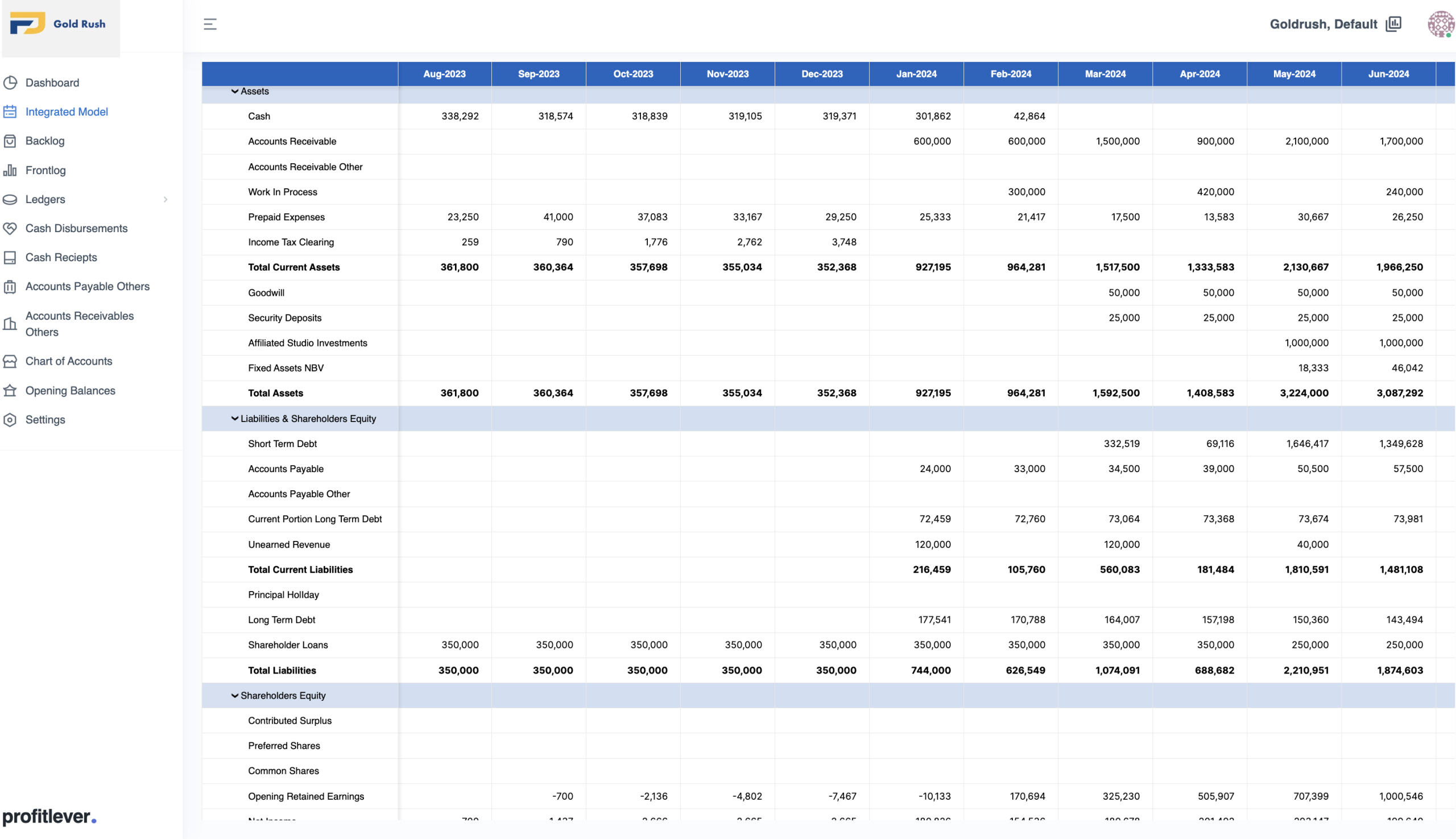
In both cases the spreadsheet was a working process that had outgrown its tool. That is the pattern to look for in your own company, and it is a better starting point than any feature list.
Mistakes that make a custom build expensive
Rebuilding commodity tools is the first. A custom invoicing app is rarely worth its upkeep when billing is standard and Tally or Zoho Books already produces a GST-compliant invoice. The second is a budget that covers the build and none of the years after it.
Encoding a messy process as it stands is the third. If the current workflow differs between the sales team and the site team, software makes the difference permanent. We ask clients to agree the process on paper first, and that conversation sometimes removes the need for software altogether.
A system with an engineering owner and no business owner drifts away from how people actually work. Migration gets underestimated too, and moving data out of four tools and reconciling the duplicates is often the largest single piece of the project. Finally, teams treat build versus buy as all-or-nothing, when many cases call for a thin custom layer over the tools they already have.
Automation once the data is in one place
When client records live in one place, workflows can run on them. An invoice can be drafted from project data the day a milestone closes. Client details can stay consistent between sales and accounts without anyone re-typing them. A complaint written in Hinglish over WhatsApp can be routed to the right team, and a site schedule can update when a design is signed off.
- 01Eventmilestone closes
- 02Ruleconditions checked
- 03Actioninvoice drafted
- 04Reviewperson approves, event logged
Start with explicit rules and a log. Add a model for routing only after the rules are clear.
Routing complaints is sometimes done with a machine learning model, which then needs labelled examples and someone checking its mistakes every week. Plain rules are cheaper to maintain and easier to explain to the operations head, so they make the sensible first version. Our piece on when a trained model earns its place over rules covers how to tell when that has changed.
Where to start
- List every subscription with its monthly cost, its owner and the date of the last login.
- Mark the overlaps and cancel what nobody uses.
- Find the process that still lives in a spreadsheet or an email thread.
- Write that process down as the job someone does today, and agree it with the people who run it.
- Only then price a tailored build against the cost of staying put, maintenance included.
The first step takes an afternoon and is useful whatever you decide afterwards. Bring that sheet, with the total at the bottom and the spreadsheet from step three, to any first call with a development partner, and the conversation starts in the right place.
From our work
Nebula Digital Accessibility
Automated Quotation and Estimation tool
Read the project story

